27 — The 10-Day Learning Plan: Everything Connected
Ye chapter kab padhen: Jab sab cheez pata ho par jodd nahi paaye — ya shuru se ek solid mental map banana ho. Yahan ek hi analogy (restaurant) se poora DevOps connect hoga. Baaki chapters me depth hai; yahan sirf badi tasveer hai.
27 vs 29 — kaunsa kab? Ye (27) understand track hai — pehli baar sab connect karna. Jab concepts clear ho jayein aur haath ka bharosa chahiye, to 29 — Confidence Sprint karo: wahan padhna nahi, apne real projects pe karke + recall karke + bol ke confidence banate ho.
The master idea: DevOps = ek restaurant chalana
Ek hi analogy. Har cheez isi mein fit hoti hai. Ek baar yeh picture ban gayi — baaki sab apne aap jud jaata hai.
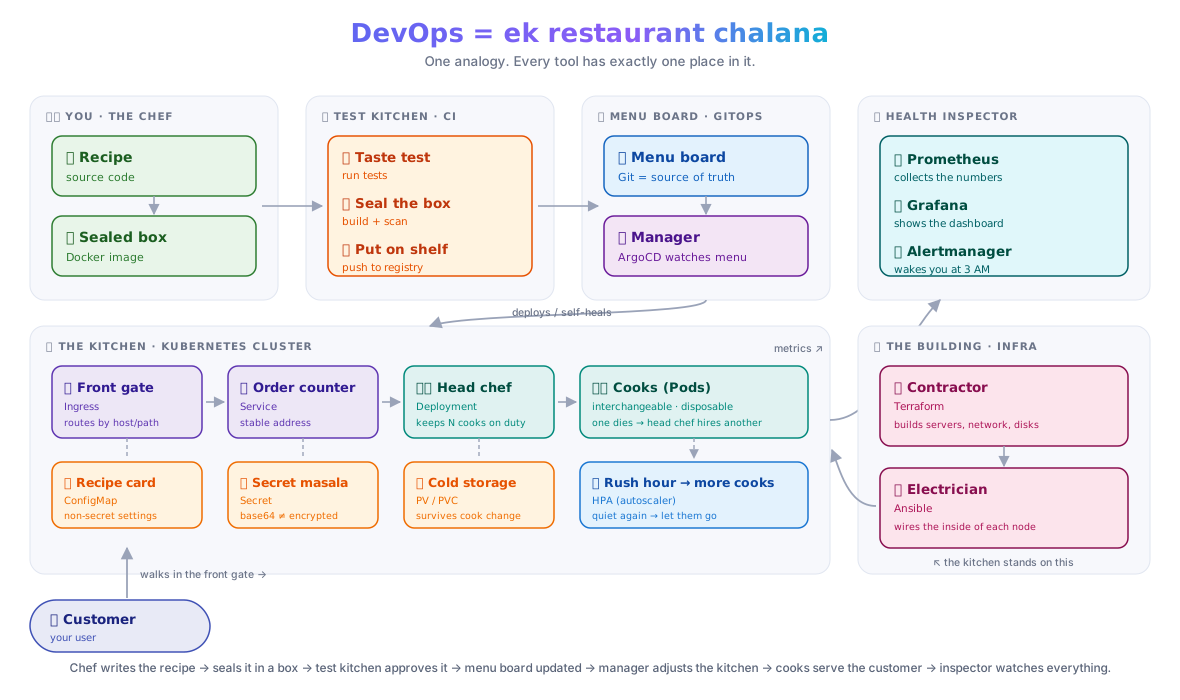
☝️ Ye ek tasveer pin kar lo. Poore handbook ka har tool isi mein kahin na kahin baitha hai — jab bhi koi nayi cheez mile, poocho: "ye restaurant mein kaun hai?"**
flowchart TD
subgraph CHEF["👨🍳 You (Developer / DevOps Engineer)"]
CODE["Recipe\n(source code)"]
IMG["Sealed box\n(Docker image)"]
CODE -->|"pack everything in"| IMG
end
subgraph CI["🧪 Test Kitchen (CI Pipeline)"]
TEST["Test the dish"]
BUILD["Seal the box"]
PUSH["Put on shelf\n(registry)"]
TEST --> BUILD --> PUSH
end
subgraph GIT["📋 Menu Board (Git config repo)"]
MENU["What to serve\n(manifests/Helm chart)"]
end
subgraph GITOPS["👔 Manager (ArgoCD)"]
WATCH["Watches menu board"]
DEPLOY["Tells kitchen: update"]
end
subgraph K8S["🍽️ Kitchen (Kubernetes Cluster)"]
COOK["Cook (Pod)"]
MGR["Head chef (Deployment)"]
COUNTER["Order counter (Service)"]
GATE["Front gate (Ingress)"]
RECIPE["Recipe card (ConfigMap)"]
MASALA["Secret masala (Secret)"]
PANTRY["Cold storage (PV/PVC)"]
MGR -->|"keeps 3 cooks"| COOK
COUNTER -->|"routes to ready cook"| COOK
COOK -.->|"reads"| RECIPE
COOK -.->|"reads"| MASALA
COOK -.->|"stores data"| PANTRY
end
subgraph INFRA["🏗️ The Building (Cloud Infra)"]
TF["Contractor (Terraform)\nbuilds the building"]
ANS["Electrician (Ansible)\nsets up inside"]
TF --> ANS
end
subgraph OBS["🔍 Health Inspector (Monitoring)"]
PROM["Prometheus\ncollects stats"]
GRAF["Grafana\nshows dashboard"]
ALERT["Alert if something wrong"]
PROM --> GRAF --> ALERT
end
CUSTOMER(["🌐 Customer (User)"])
IMG --> CI
PUSH -->|"new version available"| GITOPS
MENU -->|"source of truth"| GITOPS
WATCH --> DEPLOY --> K8S
CUSTOMER --> GATE --> COUNTER
INFRA -->|"the cluster runs on this"| K8S
K8S --> OBS
classDef chef fill:#e8f5e9,stroke:#2e7d32,color:#1b5e20
classDef ci fill:#fff3e0,stroke:#e65100,color:#bf360c
classDef git fill:#e3f2fd,stroke:#1565c0,color:#0d47a1
classDef go fill:#f3e5f5,stroke:#6a1b9a,color:#4a148c
classDef k8s fill:#e8eaf6,stroke:#283593,color:#1a237e
classDef infra fill:#fce4ec,stroke:#880e4f,color:#880e4f
classDef obs fill:#e0f7fa,stroke:#006064,color:#004d40
class CODE,IMG chef
class TEST,BUILD,PUSH ci
class MENU git
class WATCH,DEPLOY go
class COOK,MGR,COUNTER,GATE,RECIPE,MASALA,PANTRY k8s
class TF,ANS infra
class PROM,GRAF,ALERT obsRestaurant reference card — pin this somewhere
| Restaurant | DevOps | Simple baat |
|---|---|---|
| Recipe | Source code | tum chef ho — dish banate ho |
| Sealed box | Docker image | recipe + saman andar, kahin bhi kholo |
| Ready dish | Running container | box chala → dish ready |
| Cook | Pod | ek dish banata; thak gaya → replace |
| Head chef | Deployment | hamesha 3 cooks duty pe; ek gaya → naya lao |
| Name badge | Label | head chef badge se pehchanta app=web |
| Order counter | Service (ClusterIP) | customer counter pe order deta, kisi ek cook ko nahi |
| Front gate + host | Ingress | bahar se aaya customer sahi counter pe |
| Recipe card | ConfigMap | non-secret settings (DB host, port) |
| Secret masala | Secret | password, API key — andar rakho |
| Cold storage | PV / PVC | customer data permanent; cook badle to bhi safe |
| Menu board | Git config repo | "kya serve karna hai" lika hua |
| Manager | ArgoCD (GitOps) | menu board dekh ke kitchen adjust — tum haath nahi lagate |
| Test kitchen | CI pipeline | nayi recipe test → box seal → shelf |
| Building contractor | Terraform | cloud building banata (servers, networking) |
| Electrician / plumber | Ansible | building ke andar setup karta (packages, config) |
| Health inspector | Prometheus + Grafana | kitna bik raha, kahan der — alert bhejta |
| VIP section / wall | Namespace | ek restaurant ke andar alag sections; quota bhi |
| Section capacity | ResourceQuota / LimitRange | VIP section 10 tables max — zyada nahi |
| Extra cooks auto | HPA | rush hour → auto-hire; quiet → let go |
| Packaged meal deal | Helm chart | ek bundle mein sab kuch (cook + counter + gate) |
The 5-question formula — kisi bhi tool ko samajhna
Jab bhi koi nayi cheez aaye — Docker, Helm, ArgoCD, kuch bhi — yahi 5 sawaal isi order mein poocho:
| # | Sawaal | Matlab | Example (Docker) |
|---|---|---|---|
| 1 | WHY | bina iske kya problem thi? | "mere pe chalta, server pe nahi" |
| 2 | WHAT | ek line mein hai kya? | app ko sealed box mein pack karna |
| 3 | HOW | kaam kaise karta? | Dockerfile → docker build → image; docker run → container |
| 4 | WHERE | kahan chalta? | image banti CI/laptop pe; chalti kisi bhi machine pe |
| 5 | WHEN | kab use karoon, kab nahi? | app package karni ho → haan; ek chhoti bash script → zaroori nahi |
🇮🇳 Tip: Nayi cheez mein phans gaye? Yahi 5 sawaal likhlo kahin. Answer aate aate sab clear ho jaata hai.
10-day learning map
flowchart LR
  D1["Day 1\nLinux\n(zameen)"]:::d
  D2["Day 2\nGit\n(version control)"]:::d
  D3["Day 3\nDocker\n(dabba)"]:::d
  D4["Day 4\nCompose\n(local kitchen)"]:::d
  D5["Day 5\nK8s Core\n(cook+manager)"]:::d
  D6["Day 6\nK8s Config\n(masala+pantry)"]:::d
  D7["Day 7\nCI/CD\n(test kitchen)"]:::d
  D8["Day 8\nGitOps+Helm\n(manager)"]:::d
  D9["Day 9\nTerraform+AWS\n(building)"]:::d
  D10["Day 10\nEnd-to-end\n(grand opening)"]:::d

  D1 --> D2 --> D3 --> D4 --> D5 --> D6 --> D7 --> D8 --> D9 --> D10
  classDef d fill:#e8eaf6,stroke:#3f51b5,color:#1a237e
Har din ek concept, haath se karo (terminal kholke), aur poochho "ye restaurant mein kaun hai?"
Day 1 — Linux: the ground everything runs on
Restaurant mein: Linux woh zameen hai jis par poori building (cloud server) khadi hai. Bina zameen ke kuch nahi.
WHY: Har server — AWS EC2, Docker container, Kubernetes node — andar se Linux hai. Isse pata ho to koi bhi cheez troubleshoot kar sakte ho.
WHAT: Command-line operating system. GUI nahi — sirf terminal.
HOW: Commands se kaam karte hain. Mains hain:
# Jagah dhundhna
pwd           # main kahan hoon
ls -la        # kya hai yahan
cd /var/log   # wahan jao
find / -name "*.conf" 2>/dev/null   # file dhundhna

# Files padhna / likhna
cat file.txt
less file.txt        # bada file — q se exit
tail -f app.log      # live logs dekhna (bahut kaam aata hai!)

# Processes
ps aux               # sab processes
top / htop           # live CPU/memory
kill -9 <PID>        # process band karo

# Network
curl http://example.com          # HTTP request
ss -tlnp                         # kaunse port sun rahe
ping google.com                  # connectivity check

# System health (ye 4 din bhi kaam aate hain)
top          → CPU / load
df -h        → disk space
free -h      → RAM
journalctl -u nginx --since "1h ago"  → logs
WHERE: Ye commands kisi bhi Linux machine pe chalti hain — local VM, Docker container, AWS EC2.
WHEN: Kuch bhi kaam nahi kar raha — yahan se shuru karo. Troubleshooting ka pehla qadam hamesha Linux hai.
Aaj ka kaam (30 min):
1. Terminal kholo (Windows: WSL; Mac: iTerm2)
2. ls, cd, cat, tail -f karo
3. top kholo — CPU aur memory dekho
4. Ek nayi file banao, kuch likhlo, padhlo
Restaurant connection
Linux = kitchen ki zameen. Electricity (CPU), paani (memory), shelf space (disk) — sab yahan se control hota hai.
Day 2 — Git: recipe version control
Restaurant mein: Git woh recipe book hai jahan har change ka record hota hai. Koi bhi galti ki to pichhla version wapas la sakte ho.
WHY: Bina Git ke: ek hi file 10 log badal rahe → conflict → kuch lost. Git se: har change tracked, koi bhi version wapas.
WHAT: Distributed version control system. Code ka history rakhta hai.
HOW:
Workflow (tin jagah):
  Working Directory  →  Staging Area  →  Local Repo  →  Remote (GitHub)
  (files edit karo)     (git add)        (git commit)    (git push)
# Setup (ek baar)
git config --global user.name "Gaurav"
git config --global user.email "gaurav@example.com"

# Daily workflow
git init                          # nayi repo
git clone <url>                   # existing repo copy
git status                        # kya badla
git add file.txt                  # stage karo
git add .                         # sab stage karo
git commit -m "feat: add login"   # save with message
git push origin main              # GitHub pe bhejo

# Branches (features alag rakhna)
git checkout -b feature/login     # nayi branch
git merge feature/login           # merge back
git log --oneline                 # history dekho
Commit message format (isse follow karo hamesha):
WHERE: Local laptop + remote GitHub/GitLab. CI/CD pipeline bhi yehin se trigger hoti hai.
WHEN: Koi bhi code change karo → commit karo. Hamesha. Ek line ka fix bhi.
Aaj ka kaam:
1. git init my-app → ek file banao → commit karo
2. Branch banao → kuch badlo → merge karo
3. GitHub pe repo banao → push karo
Restaurant connection
Git = recipe book ka master copy. Branch = "nayi dish experiment karna" — safe rehte ho. PR = head chef ko dikhaana before menu mein add karo.
Day 3 — Docker: the sealed box
Restaurant mein: Docker woh sealed dabba hai jismein dish (app) + sab ingredients (dependencies) ek saath band hain. Kahin bhi kholo — same dish niklegi.
WHY: "Mere pe chalta tha" problem. Har developer ke laptop ka environment alag → server pe fail. Docker: ek hi environment har jagah.
WHAT: Containerization tool. App ko ek portable, isolated unit mein pack karta hai.
HOW:
Dockerfile  →  docker build  →  Image  →  docker run  →  Container
(recipe)        (dabbe mein       (sealed     (kholo)        (ready dish)
                 pack karo)        dabba)
Dockerfile example (Flask app):
FROM python:3.11-slim          # base image (pre-made dabba)
WORKDIR /app                   # working folder
COPY requirements.txt .        # copy dependencies list
RUN pip install -r requirements.txt   # install
COPY . .                       # copy code
EXPOSE 5000                    # port
CMD ["python", "app.py"]       # start command
# Build + run
docker build -t my-app:v1 .          # image banao
docker run -p 8080:5000 my-app:v1    # chalao (port map karo)
docker ps                             # running containers
docker logs <container_id>           # logs dekho
docker exec -it <id> sh              # andar ghuso (debug)
docker stop <id>                     # band karo

# Image manage
docker images                        # list
docker push registry/my-app:v1      # registry pe bhejo
docker pull nginx                    # ready image lo
Key ideas:
| Concept | Matlab |
|---|---|
| Image | sealed dabba — read-only blueprint |
| Container | chala hua dabba — running instance |
| Registry | shelf — images store hoti hain (DockerHub, ECR) |
| Layer | har RUN ek layer — cache se fast rebuild |
WHERE: Image banti hai CI machine / laptop pe. Chalti hai kahin bhi (local, server, K8s).
WHEN: App ko package karna ho. Short script/DB → usually zaroori nahi.
Aaj ka kaam:
1. Python/Node app → Dockerfile likho
2. docker build → docker run → browser mein dekho
3. docker exec se andar ghuso → files dekho
Day 4 — Docker Compose: chhoti local kitchen
Restaurant mein: Compose = poori chhoti kitchen locally chalana — cook (app), cold storage (DB), aur sab cheez ek saath, ek command se.
WHY: Real app mein sirf ek container nahi hota — app + DB + cache + queue. Sab manually chalana mushkil. Compose: ek file, ek command.
WHAT: Multiple containers ko ek saath define + chalane ka tool. Sirf local development ke liye (production mein Kubernetes hai).
HOW:
# docker-compose.yml
services:
  web:
    build: .               # Dockerfile se build
    ports:
      - "8080:5000"
    environment:
      - DB_HOST=db         # service name use karo — DNS automatic
    depends_on:
      - db

  db:
    image: postgres:15
    environment:
      - POSTGRES_PASSWORD=secret
    volumes:
      - pgdata:/var/lib/postgresql/data   # data persist karo

volumes:
  pgdata:
docker-compose up -d        # sab start karo (background)
docker-compose ps           # status
docker-compose logs web     # ek service ke logs
docker-compose down         # sab band karo
docker-compose down -v      # + volumes bhi hata do
WHERE: Sirf local laptop / dev environment.
WHEN: Local mein multiple services saath chalani hon. Production mein Kubernetes.
Aaj ka kaam:
1. Web app + PostgreSQL compose file banao
2. docker-compose up → app browser mein check karo
3. DB ko data daalo → down → up → data wapas hai? (volumes ka test)
Compose vs Kubernetes
Compose = local kitchen practice. Kubernetes = real commercial kitchen. Concepts same hain, scale alag hai.
Day 5 — Kubernetes Core: cook, manager, counter
Restaurant mein: - Pod = ek cook - Deployment = head chef (hamesha N cooks pe nazar, ek gaya → naya laao) - Service = order counter (customer cook se nahi — counter se baat karta) - Label = name badge (counter badge se pehchanta)
WHY: Docker container ek machine pe chalta. Production mein: multiple machines, failures, scaling. Kubernetes: sab handle karta hai automatically.
WHAT: Container orchestration platform. Containers ko run, heal, scale, connect karta hai.
HOW:
                   ┌─────────────────────────────────┐
  Git / CI  ─────► │         kubectl apply           │
                   │                                  │
                   │  Deployment ──► ReplicaSet ──►  Pod  Pod  Pod
                   │                                  │
                   │  Service (ClusterIP)             │
                   │     └─────finds pods by label────┘
                   │                                  │
                   │  Ingress ─────► Service          │
                   └─────────────────────────────────┘
Core YAML (Deployment + Service):
# deployment.yaml
apiVersion: apps/v1
kind: Deployment
metadata:
  name: web
spec:
  replicas: 3                    # 3 cooks
  selector:
    matchLabels:
      app: web                   # yahi badge dhundhta hai
  template:
    metadata:
      labels:
        app: web                 # badge lagao
    spec:
      containers:
      - name: web
        image: my-app:v1
        ports:
        - containerPort: 5000

---
# service.yaml
apiVersion: v1
kind: Service
metadata:
  name: web-svc
spec:
  selector:
    app: web                     # badge se pods dhundho
  ports:
  - port: 80
    targetPort: 5000
Daily kubectl commands:
kubectl get pods                    # cooks ki status
kubectl get deployments             # head chefs
kubectl get services                # counters
kubectl describe pod <name>         # detail + events
kubectl logs <pod>                  # logs
kubectl exec -it <pod> -- sh        # andar ghuso
kubectl apply -f deployment.yaml    # deploy / update
kubectl delete -f deployment.yaml   # hata do
kubectl scale deployment web --replicas=5   # scale up
kubectl rollout undo deployment web         # rollback
The self-healing loop:
flowchart LR
  DESIRED["Desired: 3 pods\n(in Deployment)"]:::gov
  ACTUAL["Actual: 2 pods\n(one crashed)"]:::run
  CM["Controller Manager\nspots the gap"]:::gov
  NEW["Schedules new pod"]:::run
  DESIRED -->|"compare"| CM
  ACTUAL -->|"compare"| CM
  CM --> NEW
  classDef gov fill:#e3f2fd,stroke:#1976d2,color:#0d47a1
  classDef run fill:#e0f2f1,stroke:#00897b,color:#004d40
WHERE: Kubernetes cluster — local ke liye kind, production ke liye AWS EKS / GKE.
WHEN: Multiple services, auto-scaling, self-healing chahiye. Single container → Docker Compose theek hai.
Aaj ka kaam:
1. kind create cluster → cluster locally
2. App deploy karo (Deployment + Service)
3. Ek pod kubectl delete pod se hata do → khud wapas aata hai dekho
4. kubectl scale se replicas badhao
Day 6 — K8s Config + Storage + Ingress
Restaurant mein: - ConfigMap = recipe card (non-secret settings) - Secret = secret masala (passwords, API keys) - PVC/PV = cold storage (data permanent) - Ingress = front gate + host (bahar se andar)
WHY after Day 5: App chal rahi hai — par config image mein hardcoded hai (galat!), data pod restart pe gayab ho jaata hai, aur bahar se access nahi ho sakti.
WHAT each does:
ConfigMap  ──mount──► Pod (env variables ya file)
Secret     ──mount──► Pod (sensitive values)
PVC ──bind──► PV ──backed by──► EBS disk
Ingress ──routes──► Service ──► Pods
ConfigMap + Secret:
# configmap.yaml
apiVersion: v1
kind: ConfigMap
metadata:
  name: app-config
data:
  DB_HOST: "postgres-svc"
  APP_ENV: "production"

---
# secret.yaml
apiVersion: v1
kind: Secret
metadata:
  name: app-secret
type: Opaque
data:
  DB_PASSWORD: c2VjcmV0MTIz   # base64 encoded (echo -n "secret123" | base64)
# Pod spec mein inject karo:
env:
- name: DB_HOST
  valueFrom:
    configMapKeyRef:
      name: app-config
      key: DB_HOST
- name: DB_PASSWORD
  valueFrom:
    secretKeyRef:
      name: app-secret
      key: DB_PASSWORD
PVC (storage claim):
apiVersion: v1
kind: PersistentVolumeClaim
metadata:
  name: db-pvc
spec:
  accessModes:
    - ReadWriteOnce
  resources:
    requests:
      storage: 10Gi
  storageClassName: gp3   # AWS EBS

# StatefulSet pod mein:
volumeMounts:
- name: data
  mountPath: /var/lib/postgresql/data
volumes:
- name: data
  persistentVolumeClaim:
    claimName: db-pvc
Ingress (HTTP routing):
apiVersion: networking.k8s.io/v1
kind: Ingress
metadata:
  name: web-ingress
  annotations:
    nginx.ingress.kubernetes.io/rewrite-target: /
spec:
  rules:
  - host: myapp.example.com
    http:
      paths:
      - path: /
        pathType: Prefix
        backend:
          service:
            name: web-svc
            port:
              number: 80
WHERE: - ConfigMap/Secret → cluster mein, pod mein mount hote hain - PVC/PV → cluster + actual cloud disk (EBS) - Ingress → cluster mein; bahar ka traffic andar laata hai
WHEN: - ConfigMap → hamesha, hardcoded config replace karo - Secret → koi bhi sensitive value (kabhi image mein mat daalo!) - PVC → database ya koi bhi stateful app - Ingress → production mein multiple services HTTP pe chahiye
Aaj ka kaam:
1. App ki config ConfigMap mein nikalo
2. Password Secret mein daalo
3. kind pe local Ingress setup karo
Day 7 — CI/CD: the test kitchen pipeline
Restaurant mein: CI/CD = test kitchen process. Nayi recipe (code) aate hi: taste test → adjust → seal karke shelf pe rakh do. Automatic — chef ko baaki kuch nahi karna.
WHY: Bina CI/CD: har developer haath se test karo, haath se build karo, haath se deploy karo. Galti hogi. CI/CD: push karo → baaki sab automatic.
WHAT: CI (Continuous Integration) = test + build automatic. CD (Continuous Delivery/Deployment) = deploy bhi automatic.
HOW — GitHub Actions:
Trigger: git push to main
    │
    ▼
Job: Test
    │  - checkout code
    │  - run unit tests
    │  - lint check
    ▼
Job: Build & Push (only if tests pass)
    │  - docker build
    │  - docker push to ECR/DockerHub
    ▼
Job: Deploy (only if build passes)
       - kubectl apply (or update image tag)
       - verify rollout
Simple GitHub Actions workflow:
# .github/workflows/deploy.yml
name: CI/CD Pipeline

on:
  push:
    branches: [main]

jobs:
  test:
    runs-on: ubuntu-latest
    steps:
      - uses: actions/checkout@v4
      - name: Run tests
        run: |
          pip install -r requirements.txt
          pytest tests/

  build-push:
    needs: test
    runs-on: ubuntu-latest
    steps:
      - uses: actions/checkout@v4
      - name: Build Docker image
        run: docker build -t my-app:${{ github.sha }} .
      - name: Push to registry
        run: |
          docker login -u ${{ secrets.DOCKER_USER }} -p ${{ secrets.DOCKER_TOKEN }}
          docker push my-app:${{ github.sha }}

  deploy:
    needs: build-push
    runs-on: ubuntu-latest
    steps:
      - name: Update image tag
        run: |
          # Update the image tag in your config repo
          # ArgoCD will pick this up automatically
          git clone https://github.com/you/config-repo
          cd config-repo
          sed -i "s|image: my-app:.*|image: my-app:${{ github.sha }}|" deploy.yaml
          git commit -am "chore: update image to ${{ github.sha }}"
          git push
Branch strategy:
WHERE: - CI runner = GitHub ka managed machine (Ubuntu, auto-provisioned) - Code = GitHub mein · secret references GitHub Actions secrets / secret-manager mein (plaintext secret Git me kabhi nahi) - Image = DockerHub / AWS ECR pe push hoti
WHEN: Koi bhi production app. Single script → zaroori nahi. Team mein ek bhi aur banda ho → CI zaroori hai.
Aaj ka kaam:
1. Repo mein .github/workflows/ci.yml banao
2. Test step daalo (simple echo "tests passed" bhi chalega)
3. Build step daalo — image banao
4. GitHub Actions tab mein run dekho
Day 8 — GitOps + Helm: menu board manager
Restaurant mein: - Helm = packaged meal deal — ek bundle mein poora restaurant setup (cook + counter + gate + config) - ArgoCD = manager jo menu board dekh ke kitchen auto-adjust karta hai — tum kitchen ko haath nahi lagate
WHY:
| Bina GitOps | GitOps ke saath |
|---|---|
kubectl apply manually |
Git mein change → ArgoCD auto-deploy |
| "kaun ne kya deploy kiya?" pata nahi | Git history = poora audit trail |
| Rollback = ek aur manual step | Rollback = git revert |
WHAT: - Helm: K8s manifests ka package manager (npm jaisa, par K8s ke liye) - ArgoCD: GitOps controller — Git repo ko cluster ka source of truth maanta hai
HOW — Helm:
Chart structure:
my-app/
├── Chart.yaml          # metadata (name, version)
├── values.yaml         # default values (override per env)
└── templates/
    ├── deployment.yaml  # {{ .Values.replicas }} aise variables
    ├── service.yaml
    └── ingress.yaml
helm install my-app ./my-app              # deploy
helm upgrade my-app ./my-app -f prod-values.yaml   # update
helm rollback my-app 1                    # rollback to version 1
helm list                                 # deployed charts
helm template ./my-app                   # rendered YAML dekho (debug)
HOW — ArgoCD:
# ArgoCD Application
apiVersion: argoproj.io/v1alpha1
kind: Application
metadata:
  name: my-app
  namespace: argocd
spec:
  project: default
  source:
    repoURL: https://github.com/you/config-repo
    targetRevision: HEAD
    path: k8s/my-app          # is folder ke manifests
  destination:
    server: https://kubernetes.default.svc
    namespace: production
  syncPolicy:
    automated:
      selfHeal: true           # koi haath se change kare → revert
      prune: true              # Git se hata do → cluster se bhi
The GitOps loop:
sequenceDiagram
  participant Dev as Developer
  participant Git as Git Repo
  participant Argo as ArgoCD
  participant K8s as Kubernetes

  Dev->>Git: git push (new image tag)
  Git-->>Argo: webhook / poll
  Argo->>Git: compare desired vs actual
  Argo->>K8s: sync (kubectl apply)
  K8s-->>Argo: status: synced ✓
WHERE: ArgoCD cluster ke andar chalta hai. Git repo = source of truth (GitHub pe).
WHEN: Multiple environments (dev/staging/prod), team work, audit trail chahiye → GitOps. Solo ek-bar deploy → plain kubectl apply theek hai.
Aaj ka kaam:
1. helm create my-app → Helm chart banao
2. Values file se dev aur prod config alag karo
3. ArgoCD install karo (kind pe) → apni app connect karo
4. Git mein change karo → ArgoCD auto-sync dekho
Day 9 — Terraform + AWS: building banao
Restaurant mein: Terraform = building contractor. Zameen kharidna, building banana, bijli connection — sab contractor ka kaam. Ansible = electrician/plumber — building ke andar setup karna.
WHY: Manually AWS console se servers banana = slow, error-prone, reproducible nahi. Terraform: ek file mein sab define karo → ek command se poora infra ready.
WHAT:
- Terraform: Infrastructure as Code — AWS resources define karo, terraform apply se bana do
- Ansible: Configuration management — servers pe software install karo, config karo
HOW — Terraform:
# main.tf — EKS cluster banana
terraform {
  required_providers {
    aws = { source = "hashicorp/aws", version = "~> 5.0" }
  }
}

provider "aws" {
  region = "ap-south-1"   # Mumbai
}

# VPC
module "vpc" {
  source  = "terraform-aws-modules/vpc/aws"
  version = "~> 5.0"
  name    = "my-vpc"
  cidr    = "10.0.0.0/16"
  azs     = ["ap-south-1a", "ap-south-1b"]
  private_subnets = ["10.0.1.0/24", "10.0.2.0/24"]
  public_subnets  = ["10.0.101.0/24", "10.0.102.0/24"]
  enable_nat_gateway = true
}

# EKS Cluster
module "eks" {
  source  = "terraform-aws-modules/eks/aws"
  version = "~> 20.0"
  cluster_name    = "my-cluster"
  cluster_version = "1.29"
  vpc_id          = module.vpc.vpc_id
  subnet_ids      = module.vpc.private_subnets
  eks_managed_node_groups = {
    main = {
      min_size     = 1
      max_size     = 5
      desired_size = 2
      instance_types = ["t3.medium"]
    }
  }
}
terraform init      # plugins download karo
terraform plan      # kya banega — preview (HAMESHA pehle)
terraform apply     # banao (confirm karo)
terraform destroy   # sab hata do
terraform output    # outputs dekho (cluster endpoint, etc)
Terraform state:
terraform.tfstate = notebook jisme likha hai "maine kya banaya"
→ kabhi delete mat karo
→ remote backend (S3) mein rakho — team ke liye
Environment strategy:
environments/
├── dev/
│   ├── main.tf
│   └── terraform.tfvars    # instance_type = "t3.small"
├── staging/
│   └── terraform.tfvars    # instance_type = "t3.medium"
└── prod/
    └── terraform.tfvars    # instance_type = "t3.large", min_size = 3
HOW — Ansible (quick):
# playbook.yml
- hosts: web_servers
  become: yes
  tasks:
  - name: Install nginx
    apt:
      name: nginx
      state: present
  - name: Start nginx
    service:
      name: nginx
      state: started
      enabled: yes
WHERE: Terraform kisi bhi machine se chalta hai (laptop, CI) — AWS pe resources banata hai. State S3 mein remote rakho.
WHEN: Koi bhi cloud infra → Terraform. Server ke andar configuration (packages, files) → Ansible. Kubernetes pe kuch deploy karna → Helm/ArgoCD (Terraform se nahi).
Aaj ka kaam:
1. AWS free tier account (agar nahi hai)
2. Terraform se ek simple S3 bucket banao → verify → destroy
3. EKS ya EC2 plan dekho (terraform plan)
Day 10 — End-to-end: grand opening
Restaurant mein: Aaj poora restaurant kholta hai — contractor ne building banayi (Terraform), electrician ne setup kiya (Ansible), kitchen ready hai (Kubernetes), cooks trained hain (Pods), pipeline automated hai (CI/CD), manager nazar rakh raha hai (ArgoCD), inspector duty pe hai (Prometheus). Grand opening!
Aaj ka goal: Ek real app zero se production tak deploy karo, har step aap khud karo.
The grand opening checklist
flowchart TD
  A["✅ App locally chalti hai\n(Day 3/4)"]:::done
  B["✅ Git repo + CI pipeline\n(Day 2/7)"]:::done
  C["✅ Docker image build + push\n(Day 3/7)"]:::done
  D["✅ K8s cluster (kind/EKS)\n(Day 5/9)"]:::done
  E["✅ Deployment + Service + Ingress\n(Day 5/6)"]:::done
  F["✅ ConfigMap + Secret\n(Day 6)"]:::done
  G["✅ Helm chart\n(Day 8)"]:::done
  H["✅ ArgoCD auto-deploy\n(Day 8)"]:::done
  I["✅ Prometheus + Grafana\n(today)"]:::today
  J["🎯 ONE commit se production update\n(today)"]:::goal

  A --> B --> C --> D --> E --> F --> G --> H --> I --> J
  classDef done fill:#e8f5e9,stroke:#2e7d32,color:#1b5e20
  classDef today fill:#fff3e0,stroke:#e65100,color:#bf360c
  classDef goal fill:#e8eaf6,stroke:#283593,color:#1a237e
Basic monitoring setup (Prometheus + Grafana)
# Helm se install karo
helm repo add prometheus-community https://prometheus-community.github.io/helm-charts
helm install kube-prom prometheus-community/kube-prometheus-stack -n monitoring --create-namespace

# Grafana access karo
kubectl port-forward -n monitoring svc/kube-prom-grafana 3000:80
# Browser: http://localhost:3000 (admin/prom-operator)
4 dashboards jo hamesha kaam aate hain:
| Dashboard | Dekho kya |
|---|---|
| K8s / Compute Resources | CPU/Memory per pod |
| K8s / Networking | Traffic per service |
| Node Exporter | Node health (disk, network) |
| Argo CD | Sync status |
The final flow — ek commit se deployment
# 1. Code change karo
git checkout -b fix/login-bug
# ... code fix ...
git commit -m "fix: resolve login timeout issue"
git push origin fix/login-bug

# 2. PR banao → merge to main
# GitHub pe PR open karo → approve → merge

# 3. CI/CD runs automatic (Day 7)
# Tests ✓ → Build image ✓ → Push to registry ✓ → Update image tag in config repo ✓

# 4. ArgoCD auto-syncs (Day 8)
# Config repo mein change detected → kubectl apply → rolling update → done

# 5. Monitor (Grafana)
# Pod restart count, error rate, latency — sab normal hai?
Yahi hai ek professional DevOps engineer ka daily routine. Push karo → pipeline chale → ArgoCD deploy kare → Grafana check karo. Sab connected.
Aaj ka real project idea (jo actually karo)
Simple web app + database + monitoring:
Flask app (Python)  ─── Dockerfile  ─── GitHub Actions ──► DockerHub
        │                                                         │
        ▼                                                         ▼
  PostgreSQL DB  ──── Docker Compose (local test)         K8s Deployment
        │                                                         │
        ▼                                                         ▼
   ConfigMap/Secret (config)                          Service + Ingress
   PVC (data storage)                                 ArgoCD (auto-sync)
   Namespace (isolation)                              Prometheus (metrics)
Ye ek simple app hai — par isme Day 1 se Day 10 ki har cheez use hogi.
Aage kya? (Day 11+)
10 din baad ye sab haath mein hoga:
| Kya | Kab kaam aayega |
|---|---|
| Linux troubleshooting | Kuch bhi kaam nahi kare → yahan se shuru |
| Git workflow | Har daily change |
| Docker | Har app package karna |
| K8s basics | Har production deployment |
| CI/CD | Har code push |
| GitOps | Har production change |
| Terraform | Nayi environment banana |
| Monitoring | Kuch issue aaye → Grafana first |
10-din ke baad recommend karo: 1. Capstone I → URL Shortener — ek real app build karo 2. Capstone II → MicroShop — microservices 3. Production Gauntlet → ShopFast build + Chaos engineering — real production experience
Quick reference: the restaurant in 30 seconds
ZAMEEN:    Linux  →  har server pe hai
RECIPE:    Git    →  code ka history
DABBA:     Docker →  app portable banao
KITCHEN:   Docker Compose → local mein sab saath
COOK:      Pod    →  running app
MANAGER:   Deployment → cooks manage karo
COUNTER:   Service → stable address
GATE:      Ingress → bahar se andar
MASALA:    ConfigMap/Secret → config alag rakho
PANTRY:    PVC/PV → data permanent
MENU:      Git config repo → kya deploy hoga
MANAGER:   ArgoCD → menu dekh ke auto-update
TEST KIT:  CI/CD  → code push se sab automatic
BUILDING:  Terraform → cloud infra banana
INSPECTOR: Prometheus/Grafana → sab theek hai?
🇮🇳 Final baat: Confusion tab hoti hai jab cheez alag-alag yaad hoti hain. Ek hi restaurant ki picture mein sab fit karo — fir koi bhi cheez alien nahi lagegi. Ye 10 din ek platform banana hai — uske upar production baad mein build hogi. Shuru karo, haath se karo, aur restaurant ki analogy se poocho: "ye kaun hai?" 😊
Connected pages: K8s Objects Map · The Connected System · M4 K8s Core · M9 Advanced Internals · Confusions & Trade-offs