32 — Lab B: VANTA-Boutique, End to End
Kya banega: Ek 12-service microservices store (Google Online Boutique base) — local kind se lekar self-managed AWS cluster + Ansible + chaos engineering tak. Ye lab tumhare apne repo (
VANTA-Boutique) pe chalta hai.⏱️ Time: ~3h guided + 40min Solo Run · 🎚️ Level: Intermediate → Senior · 📋 Pehle: Lab A · BillFree · Terraform · Ansible
Lab A vs Lab B — kyun dono?
Lab A (BillFree) = ek reusable Helm chart, 7 same-shape services, managed-style GitOps. Lab B (VANTA) = 12 alag-alag language services (Go, C#, Python, Java, Node), Kustomize overlays, self-managed kubeadm cluster (Ansible se), aur chaos engineering. Dono milke poora spectrum cover karte.
🚗 DRIVER MODE — Lab A wale hi rules
Round 1 (guided): Parts 1–7 commands ke saath — samajhne ke liye. Har command se pehle 5 second: "ye kya karegi?"
Round 2 (SOLO): Solo Run — commands nahi, sirf goals. Round 2 hi asli lab hai.
Jo command Lab A mein chala chuke ho (kubectl get/describe/logs, helm, git…) — yahan bina dekhe likho. Har boss/chaos ke baad 3-line RCA (symptom → cause → fix).
The journey — ek nazar mein
flowchart LR
  P1["1 · Git\nbranch → PR"]:::a
  P2["2 · kind\n12 services local"]:::b
  P3["3 · Kustomize\ndev/staging/prod"]:::c
  P4["4 · Build + load\nsource → kind"]:::d
  P5["5 · Self-managed\nTerraform + Ansible"]:::e
  P6["6 · GitOps\nArgoCD"]:::f
  P7["7 · Chaos\nbreak & fix"]:::g
  P1 --> P2 --> P3 --> P4 --> P5 --> P6 --> P7
  classDef a fill:#e8f5e9,stroke:#2e7d32,color:#1b5e20
  classDef b fill:#fff3e0,stroke:#e65100,color:#bf360c
  classDef c fill:#e3f2fd,stroke:#1565c0,color:#0d47a1
  classDef d fill:#f3e5f5,stroke:#6a1b9a,color:#4a148c
  classDef e fill:#fce4ec,stroke:#880e4f,color:#880e4f
  classDef f fill:#ede7f6,stroke:#5e35b1,color:#311b92
  classDef g fill:#e0f7fa,stroke:#006064,color:#004d40
Part 1 · Git — branch → PR (quick, Lab A jaisa)
git clone https://github.com/grvtech1/VANTA-Boutique.git
cd VANTA-Boutique
ls
# src/  helm-chart/  kustomize/  kubernetes-manifests/  terraform/  ansible/
# argocd/  istio-manifests/  scripts/  kind-local.yaml  skaffold.yaml

git checkout -b feat/lab-run
echo "Lab run: $(date +%F)" >> NOTES.md
git add NOTES.md
git commit -m "docs: lab run note"
git push -u origin feat/lab-run
gh pr create --title "docs: lab note" --body "Lab practice" --base main
gh pr merge --squash --delete-branch
git checkout main && git pull
🇮🇳 Git workflow dono repos mein identical hai — branch → add → commit → push → PR → merge. Ye muscle memory ban jaani chahiye.
Part 2 · Local run — 12 services kind pe (ek command)
Mental model: VANTA ka README exact commands deta hai. Ek local kind cluster jisme NodePort 30080 → host 8888 map hai (kind-local.yaml).
2.1 — Cluster + deploy
# 1. Local cluster (kind-local.yaml: NodePort 30080 → host 8888)
kind create cluster --config kind-local.yaml
cat kind-local.yaml                  # name: boutique, port mapping dekho

# 2. Dev overlay deploy (saare 12 services + Redis)
kubectl apply -k kustomize/overlays/dev

# 3. Sab Ready hone ka wait
kubectl wait --for=condition=ready pod --all --timeout=300s
kubectl get pods                     # 12 services + redis-cart
2.2 — Store kholo
# Option A — NodePort (kind-local.yaml se mapped)
# browser: http://localhost:8888

# Option B — port-forward (zyada robust)
kubectl port-forward --address 0.0.0.0 svc/frontend-external 8088:80
# browser: http://localhost:8088
Ab tum real chalti hui microservices store dekh rahe ho — frontend, cart, checkout, payment, shipping, recommendation, ad, currency — sab alag pods.
2.3 — Microservices communication dekho
kubectl get svc                      # har service ka apna ClusterIP
kubectl get pods -o wide             # kaunsa pod kis node pe

# pod-to-pod DNS (ek pod se doosre ko call)
kubectl exec deploy/frontend -- wget -qO- cartservice:7070 2>&1 | head
# → services service-name se ek doosre ko dhoondte (labels + Service)

# frontend kis-kis service ko call karta?
kubectl exec deploy/frontend -- env | grep _ADDR
# PRODUCT_CATALOG_SERVICE_ADDR, CART_SERVICE_ADDR, ...
💡 Ye microservices ka dil hai: har service ek Deployment, ek Service. Frontend baaki ko service-name se (DNS) call karta — IP se nahi. Yehi ch26 ka Service→label→pod live.
🧠 Recall: 12 services kaise communicate karte? · NodePort vs port-forward? · Service DNS kya deta?
Part 3 · Kustomize — dev/staging/prod (Helm ka bhai)
Mental model: VANTA Kustomize use karta (Helm nahi, deploy ke liye). Kustomize = base + overlays — ek base manifest, aur har env uske upar patches lagata. Templating nahi — patching.
flowchart TB
  BASE["base/\n(common manifests)"]:::b
  BASE --> DEV["overlays/dev\nreplicas:1, debug"]:::d
  BASE --> STG["overlays/staging\nreplicas:2"]:::s
  BASE --> PROD["overlays/prod\nreplicas:5, limits"]:::p
  classDef b fill:#e3f2fd,stroke:#1565c0,color:#0d47a1
  classDef d fill:#e8f5e9,stroke:#2e7d32,color:#1b5e20
  classDef s fill:#fff3e0,stroke:#e65100,color:#bf360c
  classDef p fill:#f3e5f5,stroke:#6a1b9a,color:#4a148c
ls kustomize/overlays/ # dev · staging · prod
cat kustomize/overlays/dev/kustomization.yaml
# render dekho (helm template jaisa — apply se pehle)
kubectl kustomize kustomize/overlays/dev | head -40
kubectl kustomize kustomize/overlays/dev | grep -c "kind: Deployment"
# teeno env ka farak dekho
for env in dev staging prod; do
echo "=== $env ==="
kubectl kustomize kustomize/overlays/$env | grep -A1 "replicas:" | head -4
done
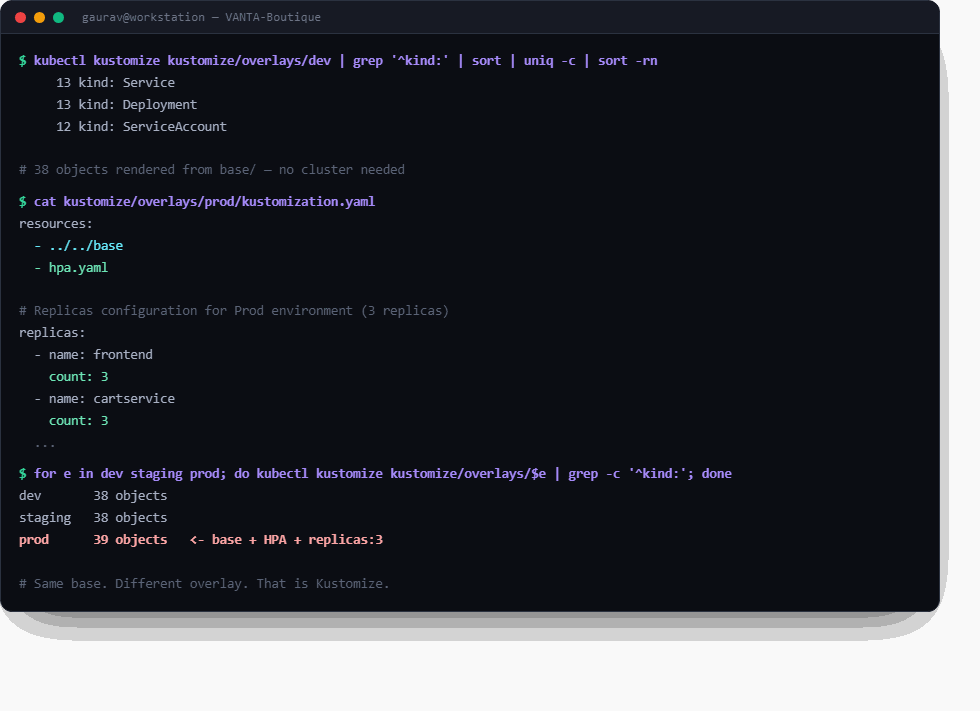
☝️ Asli output, VANTA repo se. Dhyan do: same base, par prod overlay hpa.yaml + replicas: 3 add karta hai → 39 objects. Yehi overlay ka poora idea hai — koi templating nahi, sirf patch.
Kustomize vs Helm (interview favourite)
| Kustomize (VANTA) | Helm (BillFree) | |
|---|---|---|
| Kaise | base + patches (overlays) | templates + values |
| Syntax | pure YAML, koi {{ }} nahi |
Go templating |
| Built into | kubectl -k |
alag tool |
| Best | simple env differences | complex packaging, sharing |
🇮🇳 Ek line: Kustomize kehta "ye base lo, is env ke liye ye patch lagao" (koi variable nahi — direct YAML overlay). Helm kehta "ye template lo, values bharo". Dono ek hi problem (multi-env) do tareeko se solve karte.
🧠 Recall: base vs overlay? · Kustomize vs Helm ek line? · kubectl -k kya karta?
Part 4 · Build from source → kind (custom image)
Mental model: Ab ek service ko source se build karke apne cluster mein daalo (registry ke bina — kind load).
# 2 services source se build
docker build -t reviewsservice:dev src/reviewsservice
docker build -t frontend:dev      src/frontend

# kind cluster mein load (registry ki zaroorat nahi!)
kind load docker-image reviewsservice:dev frontend:dev --name boutique

# deployment ko nayi image batao
kubectl set image deployment/reviewsservice server=reviewsservice:dev
kubectl set image deployment/frontend       server=frontend:dev
kubectl rollout status deployment/frontend
💡
kind loadka jaadu: normally image ko registry pe push karna padta, phir cluster pull karta. Local dev meinkind loadseedhe cluster ke andar image daal deta — fast iteration.
🧠 Recall: kind load kyun (registry ke bina)? · kubectl set image kya karta?
Part 5 · Self-managed cluster — Terraform + Ansible (VANTA ka USP)
Mental model: Yahan VANTA BillFree se alag hai. BillFree cloud-init use karta (cattle). VANTA Ansible use karta — nodes ko pets ki tarah manage karta, aur ek real kubeadm cluster khud banata. (Kyun: ch03 Ansible decision guide)
flowchart LR
  TF["Terraform\nEC2 · VPC · SG"]:::t -->|"empty servers"| ANS["Ansible\nplaybook.yml"]:::a
  ANS -->|"PLAY 1: verify"| N["nodes ready"]:::n
  ANS -->|"PLAY 2: kubeadm init"| M["master"]:::n
  ANS -->|"PLAY 3: join"| W["workers"]:::n
  ANS -->|"PLAY 4: health"| C["✅ cluster"]:::c
  classDef t fill:#fce4ec,stroke:#880e4f,color:#880e4f
  classDef a fill:#fff3e0,stroke:#e65100,color:#bf360c
  classDef n fill:#e8eaf6,stroke:#283593,color:#1a237e
  classDef c fill:#e0f2f1,stroke:#00897b,color:#004d40
5.1 — Infra (Terraform) — plan pehle, HAMESHA
cd terraform
cat main.tf network.tf compute.tf    # kya banega padho
terraform init
terraform plan                       # preview — kuch banta NAHI (safe)
# terraform apply                    # ⚠️ AWS bill start — sirf jab ready
terraform output                     # master/worker IPs
5.2 — Cluster (Ansible) — 4 plays
cd ../ansible
cat inventory.yml                    # masters + workers (Terraform output se)
cat playbook.yml | grep -E "name:|hosts:"   # 4 plays

# preview (--check = Ansible ka 'plan')
ansible-playbook -i inventory.yml playbook.yml --check

# actually run (kubeadm cluster ban jaata)
ansible-playbook -i inventory.yml playbook.yml
# PLAY 1: verify nodes → PLAY 2: kubeadm init master →
# PLAY 3: workers join → PLAY 4: cluster health

# compliance/audit (alag playbook — Ansible ka pet-management strength)
ansible-playbook -i inventory.yml audit-playbook.yml
5.3 — Deploy on the real cluster
export KUBECONFIG=./kubeconfig       # Ansible ne fetch kiya
kubectl get nodes                    # master + workers Ready
kubectl apply -k ../kustomize/overlays/prod
⭐ Interview gold: "VANTA self-managed hai — Terraform ne servers banaye, Ansible ne kubeadm se cluster banaya (4 ordered plays), aur ek alag audit-playbook compliance check karta. Ye tab jab nodes ko control chahiye (pets). BillFree cloud-init se karta kyunki uske nodes cattle hain."
🧠 Recall: Terraform vs Ansible kaun kya? · 4 plays kya? · --check kya? · pets vs cattle?
Part 6 · GitOps — ArgoCD (VANTA ke scripts se)
VANTA ke paas ready scripts hain:
cd ..
cat scripts/setup-argocd.sh          # ArgoCD install (master pe, timeout-safe)
bash scripts/setup-argocd.sh

# ArgoCD Application (argocd/ folder)
ls argocd/
kubectl apply -f argocd/             # apps connect

kubectl get applications -n argocd
bash scripts/sync-app.sh             # manual sync trigger

# extras VANTA provide karta:
bash scripts/setup-hpa.sh            # autoscaling
bash scripts/setup-rbac.sh           # RBAC
bash scripts/setup-pod-security.sh   # PSS
💡 Ye scripts ch30 ke concepts ko automate karte — HPA, RBAC, Pod Security Standards. Har script khol ke padho: "ye kaunsa K8s object bana raha?"
🧠 Recall: ArgoCD ka kaam? · HPA/RBAC/PSS kya karte?
Part 7 · Chaos engineering — break & fix (VANTA ki jaan)
Mental model: Ab tak sab banaya. Ab jaan-boojh ke todo aur fix karo — yahi asli SRE confidence deta. VANTA ke paas poore chaos scripts hain.
ls scripts/ | grep -E "chaos|failover|fix|diagnose|rescue"
# chaos-engineering.sh · failover-lab.sh · fix-k8s-master.sh
# diagnose-master.sh · rescue-k8s.sh · restart-kubelet.sh
7.1 — Pod kill (self-heal proof)
7.2 — Node failure (failover lab)
cat scripts/failover-lab.sh          # kya karta padho
bash scripts/prepare-failover.sh
bash scripts/failover-lab.sh         # ek node giraake dekho pods shift karte
kubectl get pods -o wide -w          # doosre node pe reschedule
7.3 — Guided chaos suite
bash scripts/chaos-engineering.sh    # menu-driven: pod/node/network/resource
# har scenario: break → observe → diagnose → fix
7.4 — Diagnose + rescue (jab master toota)
bash scripts/diagnose-master.sh      # control-plane health check
bash scripts/rescue-k8s.sh           # recovery steps
bash scripts/restart-kubelet.sh      # kubelet restart
⭐ Ye interview mein sona hai: "Maine node failure simulate kiya, pods doosre node pe reschedule hote dekhe, control-plane diagnose kiya, aur recover kiya." Ye woh war stories hain jo 2.5-saal experience dikhati hain. (Aur platform simulator mein bhi ye incidents khel sakte ho.)
🧠 Recall: self-heal kaun karta? · node gire to pods kahan jaate? · diagnose ka order?
Cleanup
kind delete cluster --name boutique
# AWS: terraform destroy (bill band karo!)
cd terraform && terraform destroy
SOLO RUN (graduation) 🎓
Commands nahi milenge. Fresh cluster, sirf goals — yehi confidence ka test hai.
kind delete cluster --name boutique se shuru. Bolte hue karo (ya record) — "ab main X kyunki Y." Target: ≤ 40 min, max 2 jhaank (upar dekhna = jhaank, count karo).
- S1. kind cluster VANTA ke config se banao (port mapping wala) — bolo mapping kya karti hai
- S2. dev overlay deploy karo; saare pods Ready; store browser mein kholo
- S3. frontend pod se cartservice ko DNS naam se call karke prove karo service discovery chalti hai
- S4. frontend ko source se build karo (
:dev2tag), cluster mein bina registry ke daalo, deployment pe chadhao, rollout complete dikhao - S5. Break: frontend Service ka selector bigado → store tootna chahiye → endpoints se prove karo kyun → fix (sim ka INC-2915 yaad hai?)
- S6. Chaos: ek pod maaro (self-heal dikhna), phir frontend ka memory limit itna girao ki OOMKilled 137 aaye →
Reason:field padho → theek karo - S7. staging vs prod overlay ka render diff nikaalo — bolo prod mein kya alag hai aur kyun
- S8. Cleanup — cluster delete
Definition of Done: 8/8 ✓, ≤2 jhaank, aur ye 3 bina dekhe bolo:
1. Kustomize overlay ne base ko kaise badla bina base chhue?
2. kind load registry ki jagah kya karta hai?
3. Exit 137 dono baar aa sakta hai — OOM aur probe-kill. Farak kis field se pata chala?
Dono Solo Runs (A + B) pass? Ab tumhare paas "maine kiya hai" wali kahaniyan hain, "maine padha hai" wali nahi. Interview Bank kholo aur inhi runs ko STAR stories mein likho.
Extension Track — jab core ho jaye (M11–M18) 🗺️
Honest scope: ye resume-candy pehle NAHI. Core (dono labs + Solo Runs) pehle — phir ye, ek-ek karke.
| Kya | Kyun / kab | Kahan se shuru |
|---|---|---|
| Service mesh (Istio) | Pod-to-pod mTLS, traffic-split, retries — jab services 10+ aur security/canary chahiye | Repo mein istio-manifests/ already hai — wahi kholo · ch15 M12 |
| Kafka / RabbitMQ | Sync HTTP → async events (order-placed → email/analytics) — jab coupling dard de | ch15 M13 |
| Argo Rollouts | Canary/blue-green automated analysis ke saath — jab har deploy pe dil dhadakta ho | ch20 deployment strategies → Rollouts |
| Karpenter / Cluster Autoscaler | Nodes ka auto-scale — jab Pending pods roz ka dard ho | ch15 M17 |
| OpenTelemetry + Jaeger/Tempo | Distributed tracing — "kaunsi service slow hai" ka exact jawab | ch10 traces section |
| Backstage (IDP) | Developer portal + golden paths — jab teams 3+ aur "kaise deploy karun" roz puchha jaye | ch15 M18 |
| Crossplane | Infra bhi K8s CRDs se (Terraform ka GitOps cousin) | ch15 M17 |
| Falco / OPA | Runtime security + admission policies (Kyverno ka bada bhai) | ch15 M16 |
🎯 Full lab recall (bina dekhe)
- VANTA ke 12 services aapas mein kaise baat karte? (Service DNS)
- Kustomize base vs overlay?
- Kustomize vs Helm — ek line?
kind loadkyun (registry ke bina)?- Terraform vs Ansible — kaun kya banata?
- Ansible ke 4 plays?
- Node gire to pods ka kya hota?
- VANTA self-managed kyun, BillFree cloud-init kyun? (pets vs cattle)
Pass = 6/8. Ye kar liya → tumne ek self-managed multi-language microservices platform poora chalaya, aur toda-fixed. 💪
Lab A + Lab B — poora spectrum
| Aspect | 🅰️ BillFree | 🅱️ VANTA |
|---|---|---|
| Services | 7 same-shape (Node) | 12 multi-language |
| Deploy tool | Helm (1 reusable chart) | Kustomize (base+overlays) |
| Cluster | managed-style (cloud-init) | self-managed (Ansible kubeadm) |
| Config mgmt | cloud-init (cattle) | Ansible (pets) + audit |
| Extra | GitOps app-of-apps | chaos engineering suite |
| Sikhata | reusable chart + GitOps | multi-lang + self-managed + chaos |
"Dono milke poora DevOps hai — ek scale-up ka clean GitOps, doosra self-managed rigor + chaos. Git → build → package → deploy → GitOps → break & fix. Ye do labs = ek engineer ka poora muscle memory."
Connected: Lab A · BillFree · Ansible decision guide · K8s Complete Reference · Chaos (Gauntlet) · The Production Simulator