31 — Lab A: BillFree-TechOps, End to End
Kya banega: Ek real 7-service SaaS ko zero se production tak chalaoge — git branch se lekar ArgoCD GitOps deploy tak. Ye lab tumhare apne repo (
billfree-techops) pe chalta hai, real commands ke saath.⏱️ Time: ~2.5h core (Parts 1–7) + ~1.5h Level 2 (Parts 8–10) + 45min Solo Run · 🎚️ Level: Intermediate → Senior · 📋 Pehle: Docker · K8s Core · Helm
Ye lab ka mental model
BillFree = growing SaaS — 7 stateless services (ek reusable Helm chart), self-managed Postgres StatefulSet, ArgoCD GitOps. Tum ek Platform Engineer ki tarah kaam karoge: code change → git → CI → Helm → GitOps → live.
🚗 DRIVER MODE — ye padhne ka lab nahi, chalane ka hai
Document padhne se confidence nahi aata — type karne se aata hai. Is lab ke do rounds hain:
- Round 1 (guided): Parts 1–7 commands dekh ke chalao — samajhne ke liye. Har command chalane se pehle 5 second ruk ke khud bolo: "ye kya karegi?"
- Round 2 (SOLO): Part 11 · Solo Run — wahan commands nahi diye hain, sirf goals + success-checks. Round 2 hi asli lab hai. Round 1 sirf uski taiyari.
Teen rules:
- Jo command is lab mein pehle chala chuke ho, use dobara dekhe bina likho. Nayi syntax dekhna theek hai; purani dekhna cheating hai.
- Parts 8–10 mein commands
🔑 Hintboxes mein chhupe hain — pehle 2 minute khud try karo, phir kholo. - Har boss fight ke baad 3-line RCA likho (symptom → cause → fix). Yehi tumhari interview war-stories banti hain. (Postmortem template: ch23)
The journey — ek nazar mein
flowchart LR
  P1["1 · Git\nclone → branch → PR"]:::a
  P2["2 · Local run\ndocker compose"]:::b
  P3["3 · Docker\nbuild + inspect"]:::c
  P4["4 · Helm\nlint → template"]:::d
  P5["5 · kind deploy\napply chart"]:::e
  P6["6 · GitOps\nArgoCD app-of-apps"]:::f
  P7["7 · Verify\nlogs · metrics"]:::g
  P1 --> P2 --> P3 --> P4 --> P5 --> P6 --> P7
  classDef a fill:#e8f5e9,stroke:#2e7d32,color:#1b5e20
  classDef b fill:#fff3e0,stroke:#e65100,color:#bf360c
  classDef c fill:#e3f2fd,stroke:#1565c0,color:#0d47a1
  classDef d fill:#f3e5f5,stroke:#6a1b9a,color:#4a148c
  classDef e fill:#e8eaf6,stroke:#283593,color:#1a237e
  classDef f fill:#ede7f6,stroke:#5e35b1,color:#311b92
  classDef g fill:#e0f7fa,stroke:#006064,color:#004d40
Prereqs check (sab installed hai?):
git --version          # 2.x
docker --version       # 24+
docker compose version # v2
node --version         # 20 (.nvmrc says 20)
helm version --short   # v3/v4
kubectl version --client
kind version           # local k8s
gh --version           # GitHub CLI (PR ke liye)
Part 1 · Git — branch se PR tak (poora workflow)
Mental model: main = sacred (hamesha deployable). Kaam hamesha ek branch pe → PR → review → merge. Kabhi seedhe main pe nahi.
flowchart LR
  M["main\n(protected)"]:::m -->|"branch banao"| F["feat/rate-limit"]:::f
  F -->|"commit + push"| PR["Pull Request"]:::pr
  PR -->|"CI green + review"| MERGE["merge → main"]:::m
  classDef m fill:#e8f5e9,stroke:#2e7d32,color:#1b5e20
  classDef f fill:#fff3e0,stroke:#e65100,color:#bf360c
  classDef pr fill:#e3f2fd,stroke:#1565c0,color:#0d47a1
1.1 — Clone + explore
git clone https://github.com/grvtech1/billfree-techops.git
cd billfree-techops

git status                          # working tree clean?
git branch -a                       # saari branches
git log --oneline -5                # recent history
git remote -v                       # origin = your repo
Structure samjho (ye poora lab isi pe chalega):
ls
# apps/  services/  packages/  deploy/  db/  infra/  docker-compose.yml
#
# services/       → 7 microservices (auth, api-gateway, ticket, analytics...)
# deploy/charts/microservice/  → ONE reusable Helm chart
# deploy/apps/*/values.yaml     → per-service values
# deploy/argocd/                → GitOps app-of-apps
# deploy/platform/              → postgres StatefulSet, redis, migrate Job
# infra/terraform/              → AWS cluster
1.2 — Branch banao (naming convention)
# type/short-description — standard convention
git checkout -b feat/gateway-shared-rate-limit
# feat/ · fix/ · docs/ · refactor/ · chore/
git branch                          # * feat/gateway-shared-rate-limit
🇮🇳 Branch = safe experiment.
mainko chhue bina naya kaam karo. Kuch bigda? branch delete,mainsafe.
1.3 — Change karo (ek real, chhota change)
Ek README note add karo (safe practice change):
echo "" >> README.md
echo "## Lab note" >> README.md
echo "Practiced the full git → PR → GitOps flow on $(date +%F)." >> README.md
1.4 — Stage → commit (3 jagah ka concept)
git status                          # RED — untracked/modified
git diff                            # exactly kya badla

git add README.md                   # stage (green ho jaata)
# git add .                         # sab stage — soch ke use karo
git status                          # GREEN — staged

git commit -m "docs: add lab note (git→PR→GitOps practice)"
Commit message format (conventional commits):
Working Dir  ──git add──▶  Staging  ──git commit──▶  Local repo  ──git push──▶  GitHub
(edit)                     (chuni hui)                (saved)                    (shared)
1.5 — Push + PR
git push -u origin feat/gateway-shared-rate-limit
# -u = upstream set (agli baar sirf 'git push')

# PR banao (GitHub CLI)
gh pr create \
  --title "docs: lab note" \
  --body "Practicing the full workflow." \
  --base main

gh pr view --web                    # browser mein PR kholo
gh pr checks                        # CI status
1.6 — Merge + cleanup
# CI green + approved ho jaye:
gh pr merge --squash --delete-branch

git checkout main
git pull                            # merged change local mein le aao
git branch                          # feature branch gayab (deleted)
Part 1 done
Tumne poora git lifecycle chalaya: clone → branch → add → commit → push → PR → merge → pull. Yehi 90% daily git hai.
🧠 Recall: 3 jagah kaunse? (working/staging/repo) · -u kya karta? · squash-merge kyun?
Part 2 · Local run — poora stack ek command se
Mental model: Kubernetes se pehle, local pe sab chalao — Docker Compose se. billfree ka docker-compose.yml mein postgres, redis, migrate Job, 6 services, web — sab hai.
2.1 — Uthao
cp .env.example .env                # environment variables
docker compose config --quiet       # YAML valid hai? (npm run validate:compose)

docker compose up -d                # sab background mein
docker compose ps                   # sab healthy?
Expected:
NAME               STATUS
postgres           Up (healthy)
redis              Up (healthy)
migrate            Exited (0)        ← Job: chala, khatam (ye sahi hai)
auth-service       Up (healthy)
api-gateway        Up (healthy)
ticket-service     Up (healthy)
...
web                Up (healthy)
💡
migratekaExited (0)sahi hai — ye ek Job hai (DB schema banao → khatam). Deployment nahi jo hamesha chale.
2.2 — Test karo
docker compose logs -f api-gateway   # live logs (Ctrl+C to stop)
docker compose logs migrate          # migration chali? "schema_migrations"
curl -s localhost:8080/healthz       # gateway health
docker compose exec postgres psql -U billfree -d billfree -c '\dt'   # tables bane?
2.3 — Break karo, fix karo (chaos)
docker compose stop postgres         # 💥 DB gira do
docker compose logs auth-service | tail   # auth ab kya bolta? (DB connect fail)
docker compose start postgres        # wapas lao → recover
docker compose ps                    # sab healthy phir se
2.4 — Cleanup
🧠 Recall: migrate Exited(0) kyun OK? · down vs down -v? · service-name se DNS kaise?
Part 3 · Docker — ek service ka image andar se
Mental model: Compose ne images build kiye. Ab ek service ko manually build karke Dockerfile samjho.
cd services/auth-service
cat Dockerfile                       # FROM → WORKDIR → COPY → RUN → CMD samjho

# build
docker build -t auth-service:lab .
docker images | grep auth-service    # image bani, size dekho

# run
docker run --rm -p 8080:8080 --name auth-lab auth-service:lab &
curl -s localhost:8080/healthz

# andar ghuso (debug ka sabse kaam ka tool)
docker exec -it auth-lab sh
  # ls, env, cat package.json — container ke andar
  # exit

docker stop auth-lab
Layer caching dekho (kyun Dockerfile order matter karta):
docker history auth-service:lab      # har layer = ek instruction
docker build -t auth-service:lab .   # dobara → "CACHED" (fast!)
🇮🇳 Dockerfile order rule: jo kam badalta (dependencies) upar, jo zyada badalta (code) neeche → cache zyada hit hoti, rebuild fast.
🧠 Recall: image vs container? · docker exec kab? · layer caching ka fayda?
Part 4 · Helm — chart lint + render (deploy se pehle)
Mental model: billfree ke 7 services ek reusable chart (deploy/charts/microservice) se chalte hain — har service sirf apni values.yaml deta. (Poora detail: ch28)
cd ../..                             # repo root

# lint — galti pakdo (billfree ka apna npm script yahi karta)
helm lint deploy/charts/microservice -f deploy/apps/auth-service/values.yaml
# → "1 chart(s) linted, 0 chart(s) failed"

# render — kya banega dekho (deploy se pehle HAMESHA)
helm template auth-service deploy/charts/microservice \
  -f deploy/apps/auth-service/values.yaml | grep "kind:"
# → Deployment · Service · HPA · PDB · ServiceMonitor · PrometheusRule
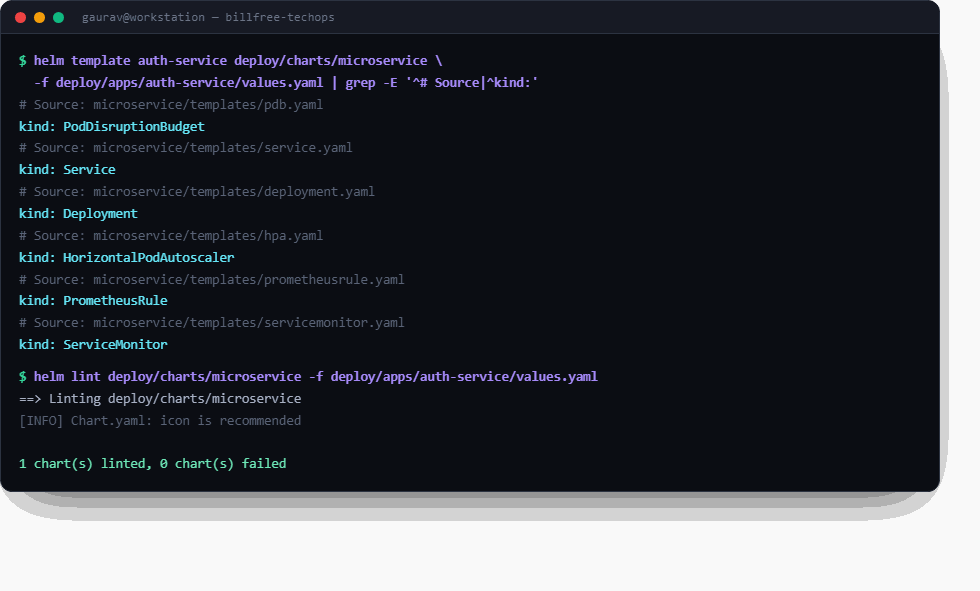
☝️ Tumhara output aisa dikhna chahiye. Ek chart → 6 objects. Aur helm lint clean — deploy se pehle yahi do commands hamesha.
4.1 — Ek chart, N services dekho
# same chart, alag values = alag service
for svc in auth-service api-gateway ticket-service; do
  echo "=== $svc ==="
  helm template $svc deploy/charts/microservice \
    -f deploy/apps/$svc/values.yaml --show-only templates/deployment.yaml \
    | grep -E "name:|image:" | head -2
done
4.2 — Values override live
# replicas badalke render dekho (deploy nahi — sirf print)
helm template auth-service deploy/charts/microservice \
  -f deploy/apps/auth-service/values.yaml \
  --set autoscaling.enabled=false --set replicaCount=5 \
  --show-only templates/deployment.yaml | grep replicas
4.3 — Sab services ek saath validate (billfree ka real script)
npm run validate:helm                # saare 8 services lint (package.json se)
# ya poora devops validate:
npm run validate:devops              # compose + terraform + helm — sab
🧠 Recall: ek chart se 7 services kaise? · helm template vs install? · values precedence?
Part 5 · kind pe deploy (local Kubernetes)
Mental model: Ab local kind cluster pe actually deploy karo — pehle Helm se manually, taaki GitOps se pehle samajh aaye.
5.1 — Cluster banao
kind create cluster --name billfree-lab
kubectl cluster-info
kubectl get nodes                    # control-plane Ready
5.2 — Namespace + platform (Postgres StatefulSet)
kubectl create namespace billfree

# default StorageClass chahiye (kind mein hoti hai; bare kubeadm mein nahi)
kubectl get storageclass             # 'standard' (default) dikhna chahiye

# Postgres StatefulSet + Service deploy karo
kubectl apply -f deploy/platform/postgres.yaml -n billfree
kubectl get pods,pvc,statefulset -n billfree -w   # postgres-0 Running + PVC Bound
💡 StatefulSet dekho: pod ka naam
postgres-0(random nahi), PVCdata-postgres-0— ch30 ka StatefulSet live.
5.3 — Ek service deploy (Helm install)
⚠️ Teen cheezein jo fresh kind cluster pe fail karti hain (ye lab actually chalake nikli)
Ye teeno maine live cluster pe hit kiye — agar in par dhyan na do to lab yahin atak jaayega:
- Chart ko Prometheus CRDs chahiye. Chart mein
ServiceMonitor+PrometheusRulehain, jo kube-prometheus-stack ke CRDs hain. Bare cluster pe:no matches for kind "PrometheusRule". → lab mein--set metrics.enabled=falsekaro (ya pehle monitoring install karo). JWT_SECRETkam se kam 16 chars. App startup pe Zod se validate karta — chhota secret = CrashLoopBackOff, exit 1.REQUIRE_GOOGLE_AUTH=falsechahiye. Service secure-by-default hai: prod mein Google OAuth enforce karta, warna start hi nahi hota. Local lab ke liye explicitly off karna padta.
# secret (out-of-band — Git mein kabhi nahi)
# ⚠️ JWT_SECRET 16+ chars — warna app start hi nahi hoga
kubectl create secret generic billfree-app-secrets -n billfree \
  --from-literal=DATABASE_URL="postgres://billfree:labpass@postgres:5432/billfree" \
  --from-literal=JWT_SECRET="lab-secret-at-least-32-chars-long-ok"

# postgres ka apna secret (StatefulSet isse envFrom se padhta)
kubectl create secret generic postgres-secret -n billfree \
  --from-literal=POSTGRES_USER=billfree \
  --from-literal=POSTGRES_PASSWORD=labpass \
  --from-literal=POSTGRES_DB=billfree

# lab-only override (CRDs nahi hain + Google auth off)
cat > /tmp/lab-override.yaml <<'EOF'
metrics:
  enabled: false          # ServiceMonitor/PrometheusRule CRDs nahi hain
env:
  - name: SERVICE_NAME
    value: auth-service
  - name: PORT
    value: "8080"
  - name: REQUIRE_GOOGLE_AUTH
    value: "false"        # non-prod: OAuth enforcement off
EOF

# Helm install
helm install auth-service deploy/charts/microservice \
  -f deploy/apps/auth-service/values.yaml -f /tmp/lab-override.yaml -n billfree

kubectl rollout status deployment/auth-service -n billfree
kubectl get pods,svc,hpa,pvc -n billfree
Sahi chalne pe aisa dikhega — ye asli output hai, real kind cluster se:
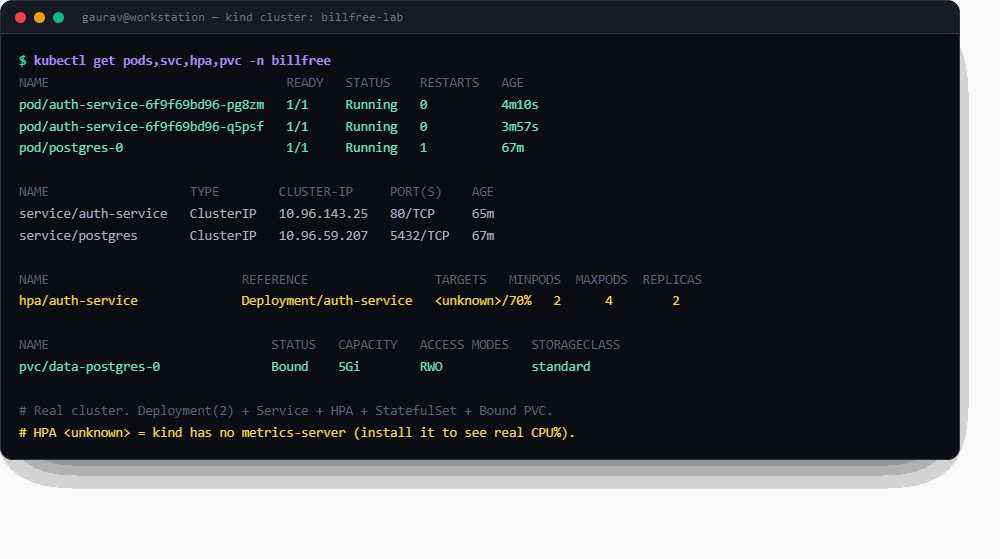
☝️ 2/2 pods Running, StatefulSet ka postgres-0, aur data-postgres-0 PVC Bound 5Gi. Dhyan do HPA <unknown>/70% dikhata — kyunki kind pe metrics-server nahi hota (kubectl apply -f https://github.com/kubernetes-sigs/metrics-server/releases/latest/download/components.yaml se aayega).
🔬 Bonus — is lab mein mila ek ASLI CrashLoopBackOff (aur uska diagnosis)
Pehli koshish mein maine JWT_SECRET="lab-secret" (10 chars) diya tha. Natija — real incident:
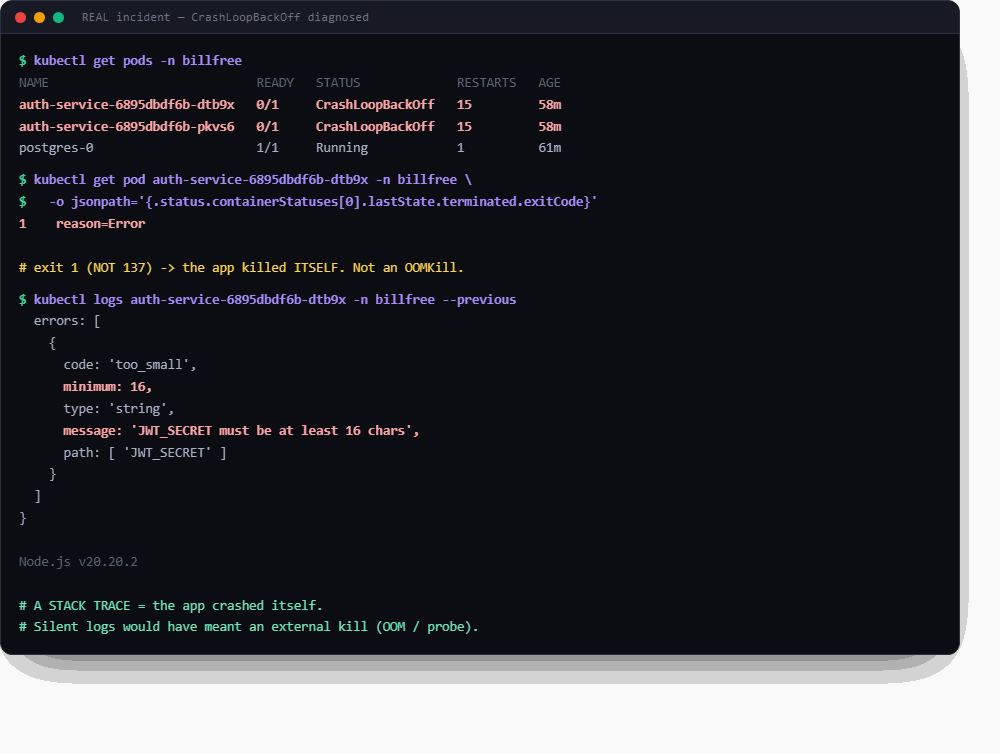
Diagnosis ka poora sabak ek jagah:
| Signal | Kya batata |
|---|---|
exit code 1 (137 nahi) |
app ne khud ko mara — external kill nahi |
| logs mein stack trace | app error. (OOMKill hota to logs silent hote) |
reason=Error |
OOMKilled nahi |
Yehi ch30 ka rule live hai: "Silent logs = external kill. Stack trace = app ne khud ko mara." Ye screenshot fabricate nahi kiya — ye asli cluster pe asli crash tha.
5.4 — Self-heal + scale dekho
# ek pod maar do → khud wapas aata (ReplicaSet ka kaam)
kubectl delete pod -l app.kubernetes.io/name=auth-service -n billfree
kubectl get pods -n billfree -w      # naya pod turant aa gaya

# upgrade (nayi image tag)
helm upgrade auth-service deploy/charts/microservice \
  -f deploy/apps/auth-service/values.yaml --set image.tag=v2 -n billfree
kubectl rollout status deployment/auth-service -n billfree

# rollback (kuch toota?)
helm rollback auth-service 1 -n billfree
helm history auth-service -n billfree
🧠 Recall: StatefulSet pod ka naam kya? · self-heal kaun karta? · helm rollback kaise?
Part 6 · GitOps — ArgoCD app-of-apps (asli production tareeka)
Mental model: Ab tak tum haath se helm install kar rahe the (push). Production mein ArgoCD Git dekhta hai aur khud sync karta (pull). Tum sirf Git badalte ho.
flowchart LR
  GIT["Git repo\ndeploy/apps/*"]:::g -->|"ArgoCD watches"| ARGO["ArgoCD\napp-of-apps"]:::a
  ARGO -->|"sync (pull)"| K8S["kind cluster\n7 services"]:::k
  YOU["You"]:::y -->|"git push only"| GIT
  classDef g fill:#e3f2fd,stroke:#1565c0,color:#0d47a1
  classDef a fill:#f3e5f5,stroke:#6a1b9a,color:#4a148c
  classDef k fill:#e8eaf6,stroke:#283593,color:#1a237e
  classDef y fill:#e8f5e9,stroke:#2e7d32,color:#1b5e20
6.1 — ArgoCD install
kubectl create namespace argocd
kubectl apply -n argocd -f https://raw.githubusercontent.com/argoproj/argo-cd/stable/manifests/install.yaml
kubectl wait --for=condition=available deployment --all -n argocd --timeout=300s

# UI access (optional)
kubectl port-forward svc/argocd-server -n argocd 8080:443 &
# admin password:
kubectl -n argocd get secret argocd-initial-admin-secret \
  -o jsonpath='{.data.password}' | base64 -d; echo
# https://localhost:8080  (user: admin)
6.2 — App-of-apps deploy (billfree ka real root)
cat deploy/argocd/root.yaml          # ek Application jo baaki sab manage karti
kubectl apply -n argocd -f deploy/argocd/root.yaml

# ArgoCD ab deploy/argocd/apps/ ke saare child apps banata
kubectl get applications -n argocd
# billfree-root · platform · api-gateway · auth-service · ticket-service ...
💡 App-of-apps pattern: ek "root" Application jo
deploy/argocd/apps/folder dekhti, aur har file ke liye ek child App banati. Ekkubectl apply→ poora platform. billfree exactly ye karta.
6.3 — GitOps loop dekho (asli magic)
# Git mein replicaCount badlo
vim deploy/apps/auth-service/values.yaml   # replicaCount: 2 → 3
git add . && git commit -m "chore: scale auth to 3" && git push

# ArgoCD apne aap detect + sync karta (~3 min ya webhook)
kubectl get application auth-service -n argocd -w   # OutOfSync → Synced
kubectl get pods -l app.kubernetes.io/name=auth-service -n billfree   # ab 3 pods
6.4 — selfHeal dekho (drift correction)
# manually badlo (production mein ye galat hai)
kubectl scale deployment auth-service --replicas=10 -n billfree
kubectl get pods -n billfree         # 10 pods (abhi)

# ArgoCD selfHeal ise Git jaisa wapas kar deta
kubectl get application auth-service -n argocd -w   # OutOfSync → auto-sync → back to 3
⭐ Interview gold: "kubectl edit se prod badla to ArgoCD selfHeal revert kar deta. Git = source of truth. Cluster galat = Git galat." — ye platform simulator ka INC-2891 bhi tha.
🧠 Recall: push vs pull CD? · app-of-apps kya? · selfHeal kya karta?
Part 7 · Verify + observe
# sab kuch healthy?
kubectl get pods,svc,hpa,pvc -n billfree
kubectl get applications -n argocd   # sab Synced/Healthy

# monitoring (community chart — ch28 advanced Helm)
helm repo add prometheus-community https://prometheus-community.github.io/helm-charts
helm install kps prometheus-community/kube-prometheus-stack -n monitoring --create-namespace
kubectl port-forward -n monitoring svc/kps-grafana 3000:80 &
# http://localhost:3000 (admin / prom-operator)

# billfree ke apne alerts (PrometheusRule) load hue?
kubectl get prometheusrules -n billfree
Cleanup (jab done)
Part 8 · Security gate — scan, leak-check, policy (Level 2)
Mental model: Production pipeline mein image bina scan ke registry tak nahi jaati, repo mein secret committed nahi hota, aur cluster :latest jaisi galtiyan policy se rokta hai — insaan ki yaad-dasht se nahi. Ab ye teeno gates khud banao. (Ab se commands hints mein — pehle khud try.)
8.1 — Trivy: image scan + CI-style gate
Goal: Part 3 wali auth-service:lab image scan karo. Phir wahi command aise chalao ki HIGH/CRITICAL milne par exit code 1 aaye (CI isi se pipeline fail karta hai — ch19 mein dekha tha).
✅ Success: vulnerability count dikha; gated run ka echo $? non-zero (ya clean image pe 0).
🔑 Hint — pehle khud try (trivy docker se chalta hai)
CVE mila to kya karein — upgrade / accept / ignore ka decision tree: ch23 F3.
8.2 — gitleaks: repo mein secret to nahi?
Goal: Poore billfree repo ki git history scan karo leaked secrets ke liye. (app-secret.example.yaml example hai — asli values out-of-band bante hain, yaad hai?)
✅ Success: report clean — ya agar kuch mila to tum bata sako rotation hi fix kyun hai, delete kyun nahi (Meridian sim ka INC-4118 yehi tha).
8.3 — RBAC audit: least-privilege proof
Goal: billfree namespace mein ek read-only ServiceAccount banao (viewer), use view ClusterRole se bind karo, aur prove karo ki wo pods padh sakta hai par delete nahi.
✅ Success: auth can-i get pods → yes · auth can-i delete pods → no.
🔑 Hint
kubectl create serviceaccount viewer -n billfree
kubectl create rolebinding viewer-rb --clusterrole=view \
  --serviceaccount=billfree:viewer -n billfree

kubectl auth can-i get pods    -n billfree --as=system:serviceaccount:billfree:viewer
kubectl auth can-i delete pods -n billfree --as=system:serviceaccount:billfree:viewer
8.4 — Kyverno: policy-as-code (:latest pe tala)
Goal: Kyverno install karo, ek ClusterPolicy likho jo :latest tag wale pods ko block kare. Phir khud test karo: ek :latest pod (block hona chahiye) aur ek pinned-tag pod (chalna chahiye).
✅ Success: :latest run pe policy ka error message; pinned pod Running.
🔑 Hint
helm repo add kyverno https://kyverno.github.io/kyverno/
helm install kyverno kyverno/kyverno -n kyverno --create-namespace

cat <<'EOF' | kubectl apply -f -
apiVersion: kyverno.io/v1
kind: ClusterPolicy
metadata: {name: disallow-latest-tag}
spec:
  validationFailureAction: Enforce
  rules:
    - name: require-pinned-tag
      match: {any: [{resources: {kinds: [Pod]}}]}
      validate:
        message: "':latest' mana hai — version ya SHA pin karo (ch23 F4)."
        pattern:
          spec:
            containers:
              - image: "!*:latest"
EOF

kubectl run bad  --image=nginx:latest -n billfree   # → BLOCKED
kubectl run good --image=nginx:1.27   -n billfree   # → chalega
kubectl delete pod good -n billfree
💥 Boss fight: Ab helm upgrade se apni auth-service pe --set image.tag=latest try karo. Policy tumhe rokegi. Fix = manifest theek karo, policy delete NAHI — jo rule tumhe rokta hai, wo kisi cheez ki hifazat kar raha hai (INC-2996 ka sabak).
🧠 Recall: Trivy gate pipeline mein kahan baithta hai? · leaked secret ka asli fix? · Kyverno Enforce vs Audit?
Stretch (optional): image signing (
cosign) + SBOM (syft) — supply-chain ka agla level. ch15 M16 mein roadmap hai; abhi zaroori nahi.
Part 9 · Jenkins — doosra CI engine, wahi pipeline (Level 2)
Mental model: GitHub Actions = hosted runners (SaaS). Jenkins = self-hosted controller+agents — wahi CI concepts, malkiyat tumhari. Company mein koi ek hota hai; tum dono ka model samajhte ho to kisi bhi CI mein ghar jaisa feel karoge. (Poori Jenkins theory + Jenkinsfile anatomy: ch22 ka Jenkins section — yahan sirf mission.)
Goal: Jenkins ko Docker mein chalao → unlock karo → ek Pipeline job banao jo billfree ka mini-CI replicate kare: checkout → install → test → docker build.
✅ Success: Jenkins UI mein pipeline green; har stage ka log padh sakte ho.
🔑 Hint — setup
docker run -d --name jenkins -p 8081:8080 \
  -v jenkins_home:/var/jenkins_home \
  -v /var/run/docker.sock:/var/run/docker.sock \
  jenkins/jenkins:lts-jdk17

# unlock password:
docker exec jenkins cat /var/jenkins_home/secrets/initialAdminPassword
# browser: http://localhost:8081 → suggested plugins → New Item → Pipeline
🔑 Hint — Jenkinsfile (pipeline script mein paste karke adapt karo)
pipeline {
  agent any
  stages {
    stage('Checkout') { steps { git url: 'https://github.com/grvtech1/billfree-techops.git', branch: 'main' } }
    stage('Install')  { steps { sh 'cd services/auth-service && npm ci || npm install' } }
    stage('Test')     { steps { sh 'cd services/auth-service && npm test || echo "no tests yet"' } }
    stage('Build')    { steps { sh 'cd services/auth-service && docker build -t auth-service:jenkins .' } }
  }
}
💥 Boss fight: Test stage ko jaan-boojh ke fail karao (sh 'exit 1'). Console log kholo, exact failing line dhoondo, fix karo. CI debugging = 90% log padhna.
🧠 Recall: Actions vs Jenkins — runner model ka farak? · Jenkinsfile kis language mein? · docker.sock mount kyun kiya?
Part 10 · containerd — Docker ke bina containers (Level 2)
Mental model: Tumhare kind node ke andar Docker hai hi nahi — kubelet seedha containerd se baat karta hai (CRI ke through). Ye khud dekhna = "K8s ko Docker ki zaroorat kyun nahi" ka jawab haath se. (Runtime stack theory: ch20)
Goal: kind node ke andar ghuso, containers ko crictl se dekho, ek container runtime level pe maaro, aur dekho kubelet use wapas le aata hai.
✅ Success: crictl ps mein containers dikhe; maare hue container ki jagah naya container (naya ID, kam AGE) aa gaya — bina kubectl ke kuch kiye.
🔑 Hint
docker exec -it billfree-lab-control-plane bash   # node ke andar

crictl ps                          # containers (Docker nahi — containerd!)
crictl images | head               # images CRI view se
ctr -n k8s.io containers ls | head # containerd ka apna CLI

# ek app container runtime-level pe stop karo:
crictl ps | grep auth              # container ID lo
crictl stop <ID>
sleep 5; crictl ps | grep auth     # naya ID — kubelet le aaya!
exit
🇮🇳 Stack ek line mein:
kubelet → (CRI) → containerd → runc → container. Docker sirf tumhare laptop pe build ke liye hai — cluster ko uski zaroorat nahi (dockershim 2022 mein hata).
🧠 Recall: CRI kya hai? · node pe Docker kyun nahi? · runtime-level kill ko kubelet ne kaise pakda?
Part 11 · SOLO RUN (graduation) 🎓
Yahi asli lab hai — commands NAHI diye. Sirf goals + success checks.
Fresh shuruat karo (kind delete cluster --name billfree-lab se). Har step apne haath se, notes/upar scroll kiye bina. Atko to pehle 2 minute khud ladho — phir hi upar dekho, aur jis step pe dekha use ❌ mark karo. Target: ≤ 45 min, max 2 ❌.
Aur ek cheez: bolte hue karo (ya record karo) — "ab main X kar raha hoon kyunki Y." Yehi interview ka riyaaz hai.
- S1. Naya kind cluster banao,
billfreenamespace - S2. Postgres StatefulSet deploy karo; prove karo PVC Bound hai aur pod ka naam ordinal hai
- S3. App secret out-of-band banao (Git mein kyun nahi — ek line mein bolo)
- S4.
auth-serviceHelm se install karo; pods Ready - S5. Ek pod maar do; prove karo self-heal hua (kaun laya wapas?)
- S6. ArgoCD install + billfree root app apply; Applications list dikhe
- S7. Drift drill: kubectl se kuch badlo → ArgoCD ko revert karte dekho → bolo Git source of truth kyun
- S8. Apni image pe Trivy gate chalao; exit code ka matlab bolo
- S9. RBAC: viewer SA se ek allowed aur ek denied action prove karo
- S10. Cleanup — cluster delete, compose down
Definition of Done: 10/10 ✓, ≤2 ❌, aur end pe ye 3 sawaal bina dekhe bolo:
1. helm install se ArgoCD sync tak — push se pull kab aur kyun shift hua?
2. postgres ka data pod maarne ke baad kyun bacha?
3. Trivy pipeline mein kahan baithta hai aur kya rokta hai?
Pass ho gaye? Tumne ek SaaS platform zero se, akele, bina notes ke chalaya. Ab Lab B — multi-language + self-managed + chaos. Fail hue? Koi baat nahi — jis step pe atke wahi Part dobara, kal phir Solo. Reps hi rasta hai.
🎯 Full lab recall (bina dekhe)
- Git ke 3 jagah +
add/commit/pushkya karte? migratecontainerExited(0)kyun sahi hai?- Dockerfile mein dependencies upar kyun (caching)?
- Ek Helm chart se 7 services kaise?
- StatefulSet pod ka naam format? PVC ka?
helm installvs ArgoCD — push vs pull?- App-of-apps pattern kya karta?
- selfHeal ne manual
kubectl scaleka kya kiya? - Trivy gate
--exit-code 1se pipeline kaise fail hota? - kind node pe Docker kyun nahi — kubelet containers kaise chalata?
Pass = 8/10 — par asli pass Solo Run hai. Wo bina notes ke kar liya → tumne ek real SaaS ka poora production lifecycle akele chalaya. 💪
The one-sentence summary
"Code branch pe likha → PR se merge kiya → Docker Compose se local verify → Helm se ek chart, 7 services render/deploy → kind pe StatefulSet + services chale → ArgoCD ne Git se GitOps sync kiya → Grafana ne health dikhaya. Push karo, baaki automatic."
Connected: Lab B · VANTA Boutique · Helm Real World · K8s Complete Reference · The Production Simulator · Confidence Sprint